Homelab Adventures Part 3 – Services?
Once you have a functional machine, it is time to use your compute resources to run your own services! Docker services can be built in two ways, with the docker run command and via a compose file using the tool docker compose. I prefer the latter, since generally setting up a docker service allows you to specify many different parameters for how that service is run. For instance, here’s a config for one of my services, Linkwarden. Linkwarden is a self hosted bookmark manager that I think just has a better tagging and notes system to keep track of my important links.
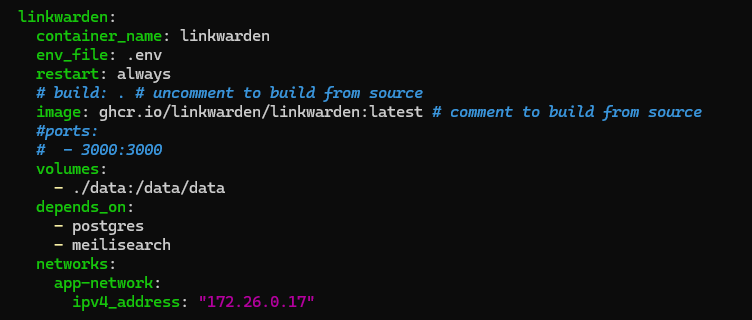
The first parameter here is the container name. You should put something descriptive here, it helps me recognize services easily in Portainer, which I use to manage all containers on my machine at once. The next section is env_file, where you can specify a file to use for any environmental variables that might be needed in the container. You can also use the “environment” label and define them in the file. Next, the restart policy specifies when the container should automatically be restarted if stopped, with several possible values such as always, on-failure, unless-stopped, and no. The image specifies where to build the container from, and the ports specifies ports to open on the host, and what port to match it with within the docker internal network. I generally do not need to do this for any port except 80 and 443, since Caddy, a reverse proxy service, is in the same docker network and directs querys from there. If you have a domain name, using something like Caddy and a custom DNS solution like PiHole means you can access services through an actual web address instead of http://localhost:port.
There are some other sections, like volumes, which map directories on your system to directories within the process, and depends_on, which makes it so that a service is only available when the other listed services function, which is useful when serves have dependencies. Finally, networks allows you to configure the docker network the service runs on. There are some other arguments too, but this is why I use docker compose. If you just do docker run, you have to specify all of this in a long command. Docker compose provides a template that makes modifying a container’s configuration quick and easy.
Another quick tip is setting up SSO for supported containers. I use Authelia, and Caddy makes sure that any request to a service is routed through it. This avoids the headache of logging in to every service over and over again. I set it up with LLDAP, which basically acts as a database of authorized users, and lets you control permissions.
Finally, you might want to consider offline access for your homelab services. You can port forward services or use a VPN. I recommend a VPN for security reasons, since it is not as easy to mess up and create security vulnerabilities. I use Tailscale, and there are lots of handy resources to get started with it. I found the videos from their official account to be very helpful.



Leave a comment